


How to Choose the Right IPTV App for Apple TV and iPhone
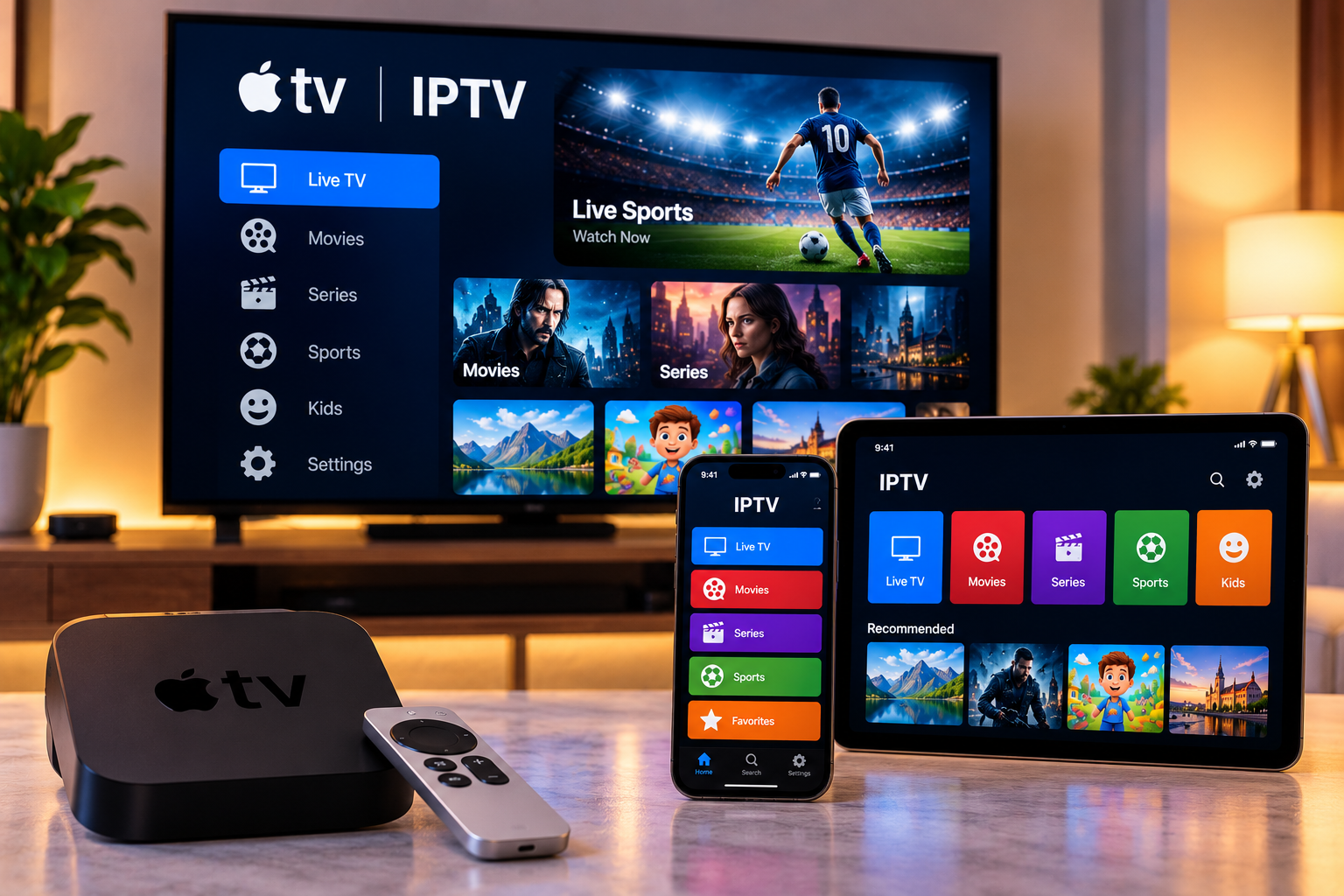
Apple TV, iPhone, and iPad are popular devices for streaming because they offer stable performance, simple interfaces, and access to a wide range of media applications. IPTV users can also watch live television, movies, series, and other content on Apple devices when they use a compatible IPTV player and properly configured service.
Choosing the right application is important because IPTV players differ in interface design, playlist support, EPG features, and device compatibility.
Understanding what to look for can make the setup process easier and improve everyday viewing.
How IPTV Works on Apple Devices
An IPTV application acts as the player between the user's device and the IPTV service.
The app itself does not necessarily provide television channels. Instead, users normally add the login information or playlist details supplied by their service.
Depending on the application, setup may involve:
-
An M3U playlist
-
Xtream-style login credentials
-
A portal address
-
Username and password details
Once the information is added correctly, the application organizes available channels and content into a user-friendly interface.
Check Apple TV Compatibility First
Not every IPTV player available for iPhone is also available for Apple TV.
Before choosing an application, users should check whether the app supports tvOS, which is the operating system used by Apple TV.
Using an application designed specifically for Apple TV can provide a better television experience because the interface is optimized for a remote control rather than a touchscreen.
Look for an Easy-to-Use Interface
A simple interface becomes especially important when an IPTV account contains a large number of channels.
Good IPTV players should make it easy to browse categories such as:
-
Live TV
-
Movies
-
Series
-
Sports
-
News
-
Children's programming
-
International channels
An organized interface can save time and make it easier to find content without scrolling through long lists.
EPG Support Can Improve Navigation
An Electronic Program Guide, or EPG, displays television schedule information.
When supported by both the IPTV service and player, an EPG can show:
-
Current programs
-
Upcoming programs
-
Start and end times
-
Program descriptions
-
Channel schedules
This can make live television feel more similar to a traditional TV experience.
For viewers who regularly watch live sports, news, or scheduled programming, EPG functionality can be particularly useful.
Favorites Make Large Channel Lists Easier
Large IPTV libraries can become difficult to navigate.
A favorites feature allows users to create a smaller list containing only the channels they watch most often.
For example, users might save:
-
Local channels
-
Favorite sports channels
-
News stations
-
Movie channels
-
Children's channels
This reduces the amount of scrolling required each time the application is opened.
Consider Search Functionality
Search is another important feature.
Instead of browsing categories manually, users can search for a channel, movie, or series by name.
This becomes more valuable as the number of available channels and on-demand titles increases.
A fast and accurate search function can significantly improve the overall IPTV experience.
IPTV on iPhone and iPad
Mobile IPTV viewing provides greater flexibility.
An iPhone or iPad can be useful when users want to watch content:
-
In another room
-
While traveling
-
Away from the television
-
On a smaller personal screen
The setup process is usually similar to Apple TV, although touchscreen controls may make navigation slightly different.
Before streaming over mobile data, users should also consider their data allowance because video streaming can consume a significant amount of bandwidth.
Wi-Fi Quality Still Matters
Apple devices may provide strong hardware performance, but the network connection remains important.
Buffering may occur when:
-
Wi-Fi coverage is weak
-
Many devices are using the network
-
The router is far away
-
Internet speed fluctuates
-
Large downloads are running in the background
For Apple TV, a stable home connection is particularly important because it is often used for longer viewing sessions.
Some Apple TV models also support Ethernet, which can provide a more consistent connection than Wi-Fi.
Check Video Resolution Support
Apple devices can support high-quality video, but users should still confirm the capabilities of their specific model.
The final picture quality depends on several factors, including:
-
IPTV source quality
-
Apple device generation
-
Television resolution
-
Internet performance
-
IPTV player capabilities
A 4K television and Apple TV do not automatically mean every stream will be available in 4K.
Users should select a video quality that works reliably with their internet connection.
Keep the IPTV Player Updated
Applications are regularly updated to improve performance, fix bugs, and maintain compatibility with newer operating system versions.
Users should keep both the IPTV application and Apple device software updated.
Updates may help resolve issues such as:
-
App crashes
-
Login errors
-
Playlist loading problems
-
Slow navigation
-
Playback interruptions
If an application starts behaving unexpectedly after a software update, restarting the device can also help.
Consider Multi-Device Support
Some users want to watch IPTV on Apple TV in the living room while also keeping the application available on an iPhone or iPad.
Before doing this, check the service's rules regarding simultaneous connections.
Installing the same player on several devices does not necessarily mean the subscription supports multiple streams at the same time.
Users comparing Nordic-focused IPTV services can review VIKING IPTV while checking device compatibility, subscription options, setup guidance, and connection requirements for their preferred Apple devices.
Use Trusted Applications
Users should install IPTV players from trusted sources whenever possible.
On Apple devices, applications available through the official App Store generally provide a more straightforward installation process.
Users should also protect their service credentials and avoid sharing login information publicly.
If an old device is sold or transferred to someone else, stored IPTV account information should be removed first.
Apple TV Remote Navigation
A well-designed IPTV app for Apple TV should work smoothly with the Apple TV remote.
Important navigation features include:
-
Fast channel switching
-
Easy menu access
-
Favorites
-
Search
-
Category browsing
-
Simple playback controls
An application that works well on an iPhone may not always provide the same quality of navigation on a television, which is why tvOS optimization matters.
Test the App Before Committing to It
If several compatible IPTV applications are available, users may want to compare them before choosing one as their primary player.
Important factors to evaluate include:
-
Interface speed
-
Playlist loading
-
EPG performance
-
Search
-
Favorites
-
Remote control navigation
-
General stability
The most feature-rich application is not always the best choice. A simpler player that works reliably can often provide a better everyday experience.
Final Thoughts
Apple TV, iPhone, and iPad can all provide convenient platforms for IPTV when paired with a compatible player and stable internet connection.
The best IPTV app should offer easy navigation, playlist compatibility, useful search tools, EPG support, favorites, and reliable performance.
Users should also consider device compatibility, simultaneous connection limits, video quality, and network stability before completing their setup.
By choosing an application that fits both the device and viewing habits, Apple users can create a more organized and convenient IPTV experience across television and mobile screens.

 English
 Arabic
 French
 Spanish
 Portuguese
 Deutsch
 Turkish
 Dutch
Dutch
 Italiano
 Russian
 Romaian
 Greek
Greek